|
|
|
OP (formerly
ObjectPrint) 4.4
OP (formerly ObjectPrint) is a software package for comprehensive print management
in small and medium-sized companies, schools, colleges and organizations.
OP enables the control, quota allocation and
restriction of printing and printer usage. This print management
system provides centralized administration over all printing
resources, printers, paper and toner.
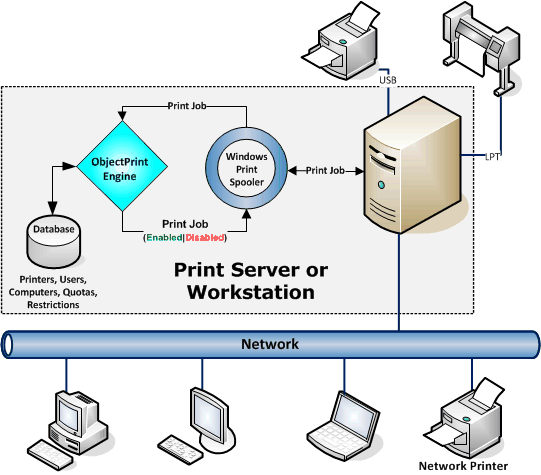
OP is
designed to manage print jobs from workstations that are spooled to
a Windows server or workstation. You can effectively monitor a
printer’s usage in a network. Using specific installed software,
ObjectPrint can track and control any local or network
printer. OP supports printers, users, computers, and
groups in Active Directory and workgroup environments.
Basic Features:
• Tracks and controls all printing activity with quotas and
restrictions
• Advanced reporting and charts
• High-performance internal database engine
• Works with most of the popular databases
• Save printed document as image
• Mixing HTTP and HTTPS access
• Enables anonymous access
• Multi-language support
• 40 days unlimited full version trial
• Unlimited number of users, printers, computers and
print servers
• No additional payments
New Features in 4.4:
• New web admin panel
• Timeline page
• OP Assistant
• Bulk actions
• Database backups (for internal database)
New Features in 4.3:
• Save printed document as image
• Change the printer settings to black and white
• Define your own logo image
• A printer alias is an alternative name for a printer
New Features in 4.2:
• Form-based authentication
• Charge for printing (standard mode/cost per sheet/cost per square unit/cost per paper length)
• Notification service
• Monitoring network printers with SNMP (supply levels and states)
• Color themes
New Features in 4.1:
• New look design
• ObjectPrint Desktop Client (authentication without login)
•
Export and email reports
• ObjectPrint Connector
for UNIX-based systems
New Features in 4.0:
• Monitors network printers and automatically discovers printers
in your network
• Advanced reporting and charting in Flash
• Viewing the printer's status in real-time
• Script triggers
OP Architecture:
|


